


Moovit: Your Transit Tracker
3.839.63K Reviews
App Specs
- Version
- Varies with Device
- Updated On
- License
- Free
- Downloads
- 100,000,000+
- Developer
- Moovit
- Categories
- Maps & Navigation
- Platform
- Android, iOS
Screenshots
 Analysis by AppCompare
Have you ever found yourself standing at a bus stop, squinting at a paper schedule, and wondering when your ride will finally show up? Well, let me introduce you to Moovit: Your Transit Tracker. This app is like having a transit-savvy buddy right in your pocket. I’ve been using it for a while, and trust me, it’s a game-changer for anyone who relies on public transportation.
When a live route is more useful than a timetable
The app makes the most sense when I need to connect several pieces of a journey rather than check one departure time. For a commute involving a bus and a train, I can enter the destination, compare route suggestions, and use the map to understand where the vehicle is in relation to my stop. That is more practical than keeping a paper timetable or searching separate operator pages, especially when I am unfamiliar with the area.
A realistic use is leaving work without knowing whether I should walk quickly to the usual stop or take a different connection. I can check the suggested options before setting off, then watch the route as I travel. I still treat live information as guidance rather than a promise: traffic, service changes, and gaps in local updates can affect what appears on screen. If a connection is important, I leave room for a missed bus instead of planning every leg down to the last minute.
Guides and Analysis on Moovit: Your Transit Tracker
Getting Started with Moovit
First things first, downloading Moovit is a breeze. Whether you're on Android or iOS, just hit up your app store, and you'll be set in no time. Once you dive into the app, you'll notice its sleek design. It’s super intuitive, and you won't find yourself lost in a maze of settings. You just pop in your destination, and Moovit does the rest!
Real-Time Journey Planning
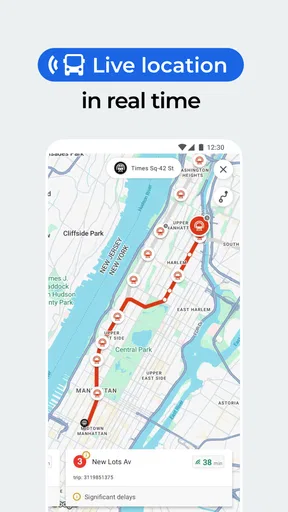
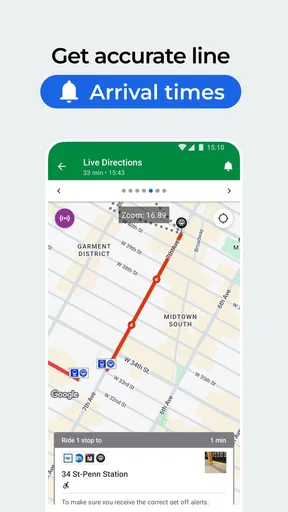
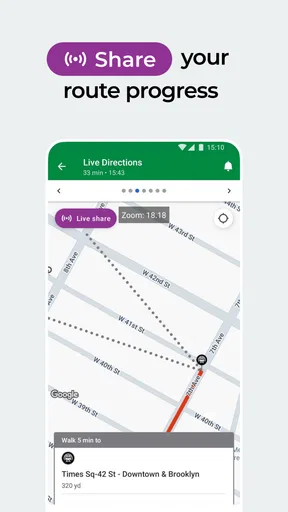
One of my favorite features is the real-time journey planning. You can literally see where your bus or train is on the map. It’s like magic! No more guesswork or trying to remember when the next bus is supposed to arrive. Moovit keeps you in the know with live updates. Plus, it even suggests the best routes, so you're always on the fastest track.
And it’s not just about buses and trains. Moovit covers a wide range of transit options: metro, light rail, ferries, and even bike paths. Whatever your mode of transport, Moovit has got you covered.
Making route choices that fit the day
When Moovit gives me more than one way to travel, I do not automatically pick the route that looks quickest. I also consider how many transfers it involves, whether a long walk is comfortable in the weather, and how much uncertainty I can tolerate. A route with fewer changes can be the better choice when I am carrying bags or travelling with someone who needs a calmer pace, even if another option looks faster on the screen.
Worth Reading Before You Choose

Flipboard Shows What News Apps Must Do Beyond the Feed

Switching to Android Auto Means Rethinking Your Driving Routine

Google Calendar Makes a Crowded Week Easier to Manage

Ludo King Makes the Most of the Minutes Between Plans

Baby Panda World Brings Quick Play to Modern Phones, but Its Game Library Feels Busy

ESPN’s Live Game View Makes Following Close Games Easier
This is one of the more useful habits to build: check the route before leaving, then confirm the key leg again when I am near the stop or station. That gives me a chance to notice a changed suggestion without staring at my phone for the whole trip. For a familiar commute, I can use the same routine each day; for a new neighbourhood, I spend a little more time checking the map and the transfer points.
Customization and Alerts
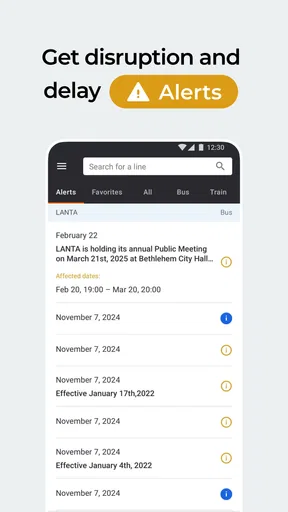
Another nifty feature is the custom alerts. You can set notifications for your usual routes, and Moovit will buzz you if there are any delays or changes. It’s like having a personal assistant keeping an eye on your commute. Honestly, this has saved me from being late more times than I can count!
The app also allows for plenty of customization. Want to avoid certain types of transport or prefer to stick to wheelchair-accessible routes? Moovit lets you tailor your experience to your needs. It’s these little touches that make it feel like the app was made just for you.
Settings worth checking before relying on a route
I recommend reviewing preferences before assuming every suggested journey suits you. If you want to avoid a particular transport type, or need an accessible route, setting that preference can make the results more relevant. The trade-off is that fewer suitable options may remain, so I would compare the alternatives and check the route details rather than assuming the first result is automatically the best one.
Alerts are most helpful when they support a repeatable routine. I would set them for routes I actually use, then keep notifications focused on useful changes rather than treating every possible alert as essential. When a journey is unfamiliar, I still open the route myself before heading out: an alert can help me react, but it does not replace checking where I need to board or transfer.
Community-Driven Insights
What sets Moovit apart from other transit apps is its community-driven approach. Users can contribute information about their local transit systems, which means the data is constantly updated and incredibly reliable. It’s like a collective brain of transit wisdom, and you get to tap into it for free!
And speaking of free, the app is completely free to download and use. There are no hidden fees or sneaky in-app purchases. Just pure, unadulterated convenience at your fingertips.
Repeatable habits for a smoother commute
For a route I take regularly, I find it useful to settle on a simple sequence: check the destination and options before leaving, note the stop or station where a transfer happens, and use the live map when the next vehicle matters. This avoids repeatedly rebuilding the same decision while I am already in a hurry. It also makes it easier to spot when today’s route differs from the one I usually take.
For occasional travel, I use Moovit differently. I enter the destination while I have time to think, compare the suggested journeys, and pay attention to the walking portions as well as the transit legs. A route that looks neat as a line on a map may involve a transfer point I would rather avoid. Thinking through that choice before boarding is a small step that can prevent a confusing mid-journey rethink.
Worldwide Coverage
Moovit boasts impressive worldwide coverage. Whether you're navigating the streets of New York City or exploring the public transport in Tokyo, Moovit has detailed information available. It's like having a personal guide who knows all the local secrets, without the awkward small talk.
For those who travel a lot, this app is a must-have. You’ll never have to worry about figuring out a new city's transit system again. It’s like a universal translator, but for public transit.
Where it fits among other navigation choices
Compared with a map app that is mainly built around driving or walking, Moovit is more focused on public transport choices and the practical sequence of a transit journey. That makes it a good first place to look when I need to combine local buses, rail, or other supported transport. A local transit agency’s own app or notices can still be the better source for operator-specific details, while a general map may be more convenient if I am mostly walking or driving.
I would not make Moovit my only plan for a route where a missed connection has serious consequences. Its real-time view and route suggestions are useful, but live transit information can vary by location and service. I check the key leg and leave a buffer when the timing matters. And although the app is free to download, it includes in-app purchases priced from $0.99 to $19.99 per item, so I would review any purchase prompt rather than assume every optional extra is included at no cost.
Who will get the most from it
I would recommend Moovit to people who regularly rely on buses and trains, anyone who is learning a city’s transit network, and travellers who want one place to compare public transport routes. Its route planning is especially handy when a journey includes transfers or when I need to choose between several modes. The app is rated for Everyone, and its broad purpose is easy to understand even if I only use it for a straightforward trip.
It is less compelling if I rarely use public transit, already have a dependable local tool that covers my routes, or mainly need turn-by-turn driving directions. Someone who depends on precise accessibility details should also check the route carefully and confirm that the particular stations and vehicles work for their needs. A setting can guide route selection, but I would not treat it as a guarantee about every part of a journey.
How much confidence should I place in the app?
Moovit is developed by Moovit and has an average rating of 3.9 from around 1.5 million ratings, with about 39,000 written reviews and more than 100 million installs. Those figures suggest it is widely used, but they do not mean every city, route, or update will feel equally dependable. My own rule is to use it as a strong planning companion, then apply common sense at the stop: read the posted information, watch for service notices, and keep an alternate route in mind when timing is tight.
That balance matters more than expecting a transit app to eliminate every uncertainty. If the map and the actual stop disagree, I trust what is happening on the ground and check another source when needed. If the suggested transfer looks rushed, I choose a less brittle option where possible. These habits let the app save effort without handing over every travel decision to a screen.
Final Thoughts
In a world where time is money and patience is often in short supply, Moovit: Your Transit Tracker makes navigating public transport a breeze. It’s reliable, easy to use, and packed with features that make your daily commute or your travel adventures smoother than ever.
If you haven’t tried it yet, give it a whirl. You might just find yourself wondering how you ever got around without it. And who knows? You might even start looking forward to your daily commute. Now, wouldn't that be something?
Pros
- Comprehensive route planning options.
- Real-time updates on transit schedules.
- User-friendly interface with easy navigation.
- Coverage in multiple cities worldwide.
- Alerts for service disruptions and delays.
Cons
- Requires constant internet connection.
- Some routes may have outdated info.
- Battery consumption can be high.
- Limited offline functionality.
- Advertisements can be intrusive.
FAQs for Moovit: Your Transit Tracker
What is Moovit and how does it work?
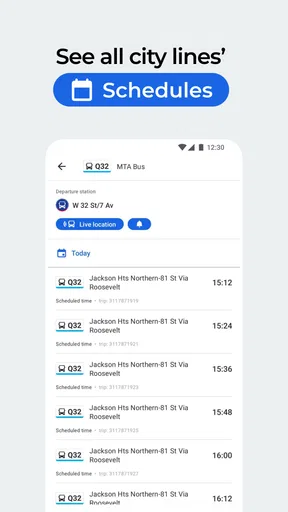
Moovit is a comprehensive transit app designed to help users navigate public transportation systems worldwide. It provides real-time updates on bus, train, and metro schedules, as well as step-by-step directions. The app uses GPS data and crowd-sourced information to ensure accuracy, making it easier for travelers to plan their journeys efficiently.
Is Moovit available in my city?
Moovit is available in over 3,000 cities across more than 100 countries. To check if it covers your area, simply download the app and enter your location. The app will automatically display available transit options and schedules for your region, ensuring you have access to the most relevant information.
How accurate is the real-time data provided by Moovit?
Moovit leverages a combination of official transit data and user-generated reports to deliver real-time updates. While the app strives for high accuracy, factors like unexpected traffic or service changes can affect precision. Users are encouraged to contribute data to improve accuracy and stay informed of any changes along their routes.
Does Moovit require an internet connection to function?
Moovit requires an internet connection to access real-time updates and download transit schedules. However, once the necessary data is downloaded, you can use certain features offline, such as viewing saved routes and schedules. For the most accurate and up-to-date information, maintaining an internet connection is recommended.
Is Moovit free to use, or are there any in-app purchases?
Moovit is a free app available for both Android and iOS devices. It offers all core features without charge, ensuring users can access transit information easily. While there are no mandatory in-app purchases, the app may offer additional services or features for a fee, enhancing the overall user experience.


